


Transit - Subway & Bus Times
4.638.49K Reviews
App Specs
- Version
- 6.1.12
- Updated On
- License
- Free
- Downloads
- 10,000,000+
- Developer
- Transit, Inc.
- Categories
- Maps & Navigation
- Platform
- Android, iOS
Screenshots
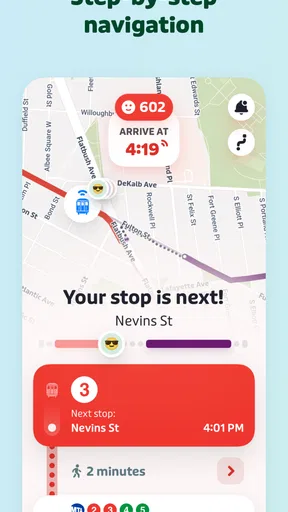
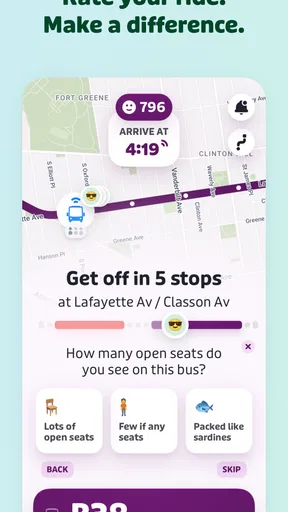

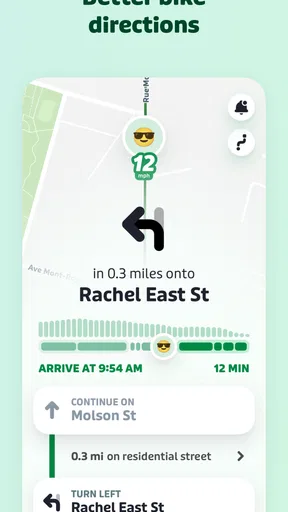
 Analysis by AppCompare
When my household is heading in different directions, a transit app can be useful even if nobody is making the same trip. One person may be checking a subway connection while another is trying to time a bus home, and we can compare plans without turning the kitchen into a timetable desk. Transit • Subway & Bus Times is built for navigating public transportation, so its value is clearest when the trip depends on routes, stops, and service conditions rather than a car-focused map.
One app, separate journeys
I find this kind of tool most helpful when several people need to make independent plans in a city. A parent can check a route to an appointment, while a teenager looks up a way to meet friends; each person can enter their own destination and weigh the options. That is coordination by sharing a plan, not a family-management system, and I would not assume the app organizes household members or keeps everyone’s schedules in sync.
A practical routine is to check the route before leaving, then look again near the stop if timing matters. For example, if I am taking a bus to meet someone after work, I can compare the suggested trip with what is happening on the map and decide whether to wait or consider another route. I still leave a little margin: live estimates and service conditions can change, so I treat them as useful guidance rather than a promise that a vehicle will arrive at an exact moment.
Keep personal choices in mind
On a shared phone or tablet, I would be deliberate about whose destination and route are on screen before handing the device to someone else. Transit planning can reveal where a person is going, even in an ordinary household setting. I would not treat sharing a device as the same thing as sharing an account or trip history, and I would check the app directly before relying on any particular account arrangement. For a child’s first independent journey, an adult can help review the route together, then make sure the child knows what to do if a connection changes.
Transit is free to download, with in-app purchases listed from $2.99 to $50.00 per item. The app is rated for Everyone, and it comes from Transit, Inc. Its average rating is 4.6 from around 338,000 ratings, with more than 10 million installs. Those figures suggest a widely used option, but they do not tell me whether a particular stop, route, or local service will suit your trip, so I would test the journeys your household actually makes.
Getting Around with Ease
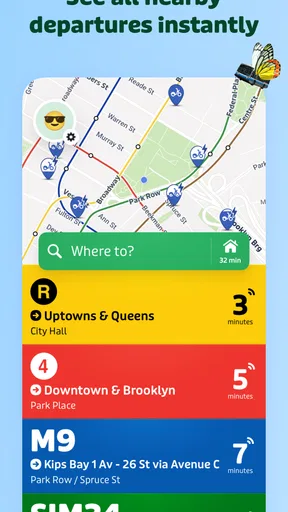
First off, Transit • Subway & Bus Times is your go-to app for everything public transport. It covers a wide range of transit systems, from subways to buses, all wrapped up in a neat, user-friendly package. The first time I opened it, I was pleasantly surprised by how intuitive the interface is. No more endless scrolling through confusing menus. Everything you need is just a tap away.
Real-Time Updates
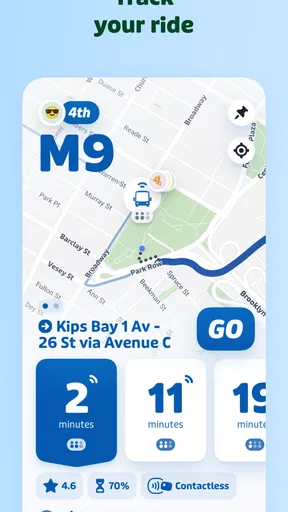
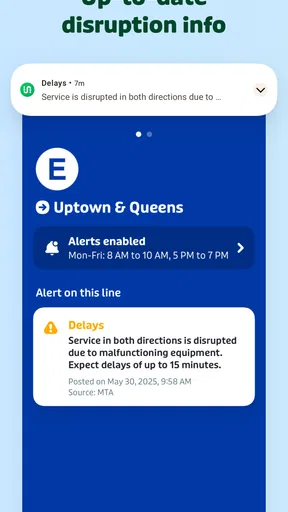
This app excels in providing real-time transit updates. Imagine standing at a bus stop and wondering if you missed your ride. With Transit, you can see exactly where your bus is on the map, how long it’ll take to get to you, and even if there are any unexpected delays. It’s like having a personal transit assistant in your pocket!
Worth Reading Before You Choose

Baby Panda World Brings Quick Play to Modern Phones, but Its Game Library Feels Busy

ESPN’s Live Game View Makes Following Close Games Easier

QuizzLand Review: A Good Fit for Short Trivia Breaks, Not Every Player

Basketball Stars: Multiplayer Is Fast, but Can It Recover When Matches Go Wrong?

WEBTOON Turns Phone Updates Into a Better Reading Routine

Link to Windows Runs on Shared Habits, Not Social Feeds
Plan Your Journey
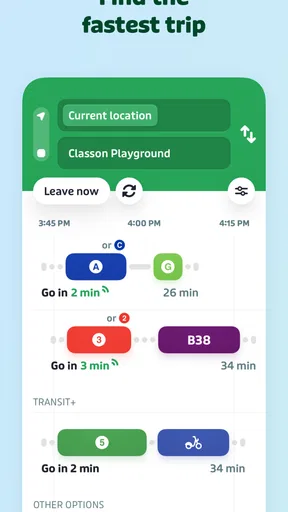
Planning a trip across town? No problem. Transit lets you set your start and end points and offers you various route options, complete with estimated travel times. Plus, it factors in current traffic conditions, so you can avoid any unwanted surprises. This feature has saved me more times than I care to admit, especially during rush hour.
Sleek Design and Usability
What really sets this app apart is its sleek design. The colors are vibrant yet not overwhelming, and the icons are intuitive. I never felt lost navigating through the app, which is a huge plus. The developers clearly put a lot of thought into making it as user-friendly as possible.
Community Alerts
Another cool feature is the community alerts. Users can report issues like service disruptions or crowded vehicles, and these alerts pop up instantly, keeping everyone in the loop. It’s like having a community of commuters helping each other out. How cool is that?
Where its city coverage matters
The app’s reach is one reason I would consider it for city breaks as well as everyday commutes: it supports transit networks such as MTA, NJ Transit, MBTA, SEPTA, BART, MARTA, and CTA, alongside more than 1,000 cities. That breadth is useful when a household travels between regions and does not want to learn a completely different interface for every visit. Still, I would check the specific city and the exact journey before depending on it; broad coverage does not make every local service equally familiar or every route equally convenient.
Compared with a general-purpose map app, Transit keeps public transportation at the center of the experience, which makes it a natural choice when I need to compare bus and subway options quickly. A transit agency’s own app can be the better second opinion for a service-specific notice or official operating details. I would use Transit to orient myself and compare trips, then consult the agency when a disruption could change an important connection. For a short walk or a drive, a standard maps app may be simpler.
A few habits that make it more useful
Before a trip with a tight connection, I check more than the headline arrival estimate: I look at the alternative route and consider whether a different transfer would leave me with a safer margin. For a familiar commute, saving mental effort matters more than shaving off every possible minute; for an unfamiliar neighborhood, I allow extra time to locate the stop and confirm the direction of travel. These small choices make route suggestions easier to use without treating an estimate as a guarantee.
Community reports can add context that a formal route plan may not convey, but they are still reports from other riders. I treat them as a prompt to look again, not as official confirmation. If the trip is time-sensitive, checking the route close to departure and keeping a backup in mind is sensible. That is a useful trade-off: rider input can make the picture feel more immediate, while accuracy and usefulness may depend on what other commuters have noticed and shared.
Who should choose it
I would recommend Transit to people who regularly use buses or subways, visitors who need to make sense of unfamiliar city networks, and households whose members travel separately but want a straightforward way to plan each journey. The app is developed by Transit, Inc., and version 6.0.13 requires iOS 7.0 or later. Its long-running presence, dating back to July 29, 2013, and its 37,000 reviews give prospective users plenty of public feedback to consider, though I would still judge it by how well it handles my own routes.
It is less compelling if you rarely use public transit, depend on detailed driving directions, or need an app to coordinate a group’s movements automatically. I would also avoid relying on a single app as the authority for a major service change: check the route again and use the transit operator’s information when the consequences of a missed connection are high. Those are not reasons to dismiss Transit; they are sensible boundaries for any trip planner.
Age, trust, and the household call
With an Everyone content rating, the app is suitable for a broad audience, but that rating is not a substitute for an adult helping a younger rider learn the route. I would practice the journey together, point out where to transfer, and talk through what to do if the service changes. For shared devices, I would also make a habit of clearing the screen back to a neutral view before passing it on, especially if the visible destination is personal.
My household verdict is positive when public transportation is part of daily life: Transit makes route planning and checking live conditions feel approachable, and its city coverage can be handy across home and travel. I would pair it with common sense, an alternate plan for important trips, and official service information when needed. If your household mainly drives or needs shared scheduling rather than individual route planning, it is probably not the tool to organize everyone’s day. But for people who ride buses and subways, it is an easy app to keep close when plans change at the stop.
In conclusion, if you're someone who relies on public transportation, Transit • Subway & Bus Times is a game-changer. It's reliable, easy to use, and packed with features that make navigating the city a breeze. So, if you haven't already, give it a go. Trust me, your future self standing at the bus stop will thank you.
Pros
- Real-time transit updates enhance planning.
- Includes multiple city transit systems.
- User-friendly interface with customizable alerts.
- Offline mode for route planning.
- Integrates with popular map apps for navigation.
Cons
- Occasional inaccuracies in schedule data.
- High battery usage during active tracking.
- Ads can be intrusive in free version.
- Limited rural area coverage.
- Requires data for full functionality.
FAQs for Transit - Subway & Bus Times
What features does Transit • Subway & Bus Times offer?
Transit • Subway & Bus Times provides real-time information on public transit, including bus, subway, and train schedules. It offers route planning, service alerts, and live tracking of vehicles. Users can also access step-by-step navigation and find nearby transit options to make their commute smoother and more efficient.
Is Transit • Subway & Bus Times available offline?
Yes, Transit • Subway & Bus Times offers offline capabilities. Users can download schedules and maps to access them without an internet connection. This is particularly useful for travelers who need to navigate areas with limited connectivity or want to minimize data usage while commuting.
How accurate is the real-time tracking feature?
The real-time tracking feature in Transit • Subway & Bus Times is generally quite accurate, as it relies on live GPS data from transit agencies. However, factors like network availability and transit agency updates can affect accuracy. Users are encouraged to check multiple sources or alerts within the app for the most reliable information.
Does the app support transit options worldwide?
Transit • Subway & Bus Times supports a wide range of cities around the world, covering major transit systems in North America, Europe, Asia, and other regions. The app continuously updates its database to include more cities and services, ensuring that users have access to reliable transit information wherever they are.
Are there any costs associated with using the app?
Transit • Subway & Bus Times is free to download and use, although it may offer in-app purchases or premium features for an enhanced experience. These might include ad-free usage or advanced route planning tools. Users can choose to use the free version or upgrade, depending on their needs and preferences.


